Setting Up Webhooks
Overview
Products describe the specific goods or services you offer to your customers. For example, you might offer a Standard and Premium version of your goods or service; each version would be a separate Product. They can be used in conjunction with Prices to configure pricing in Payment Links, Checkout, and Subscriptions.
Prerequisites
Before setting up webhooks, ensure you have:
- A registered NGnair Payments account
- Merchant account setup completed
- Access to the Admin Dashboard
- An endpoint URL that can receive POST requests
Setup Steps
- Navigate to Admin Dashboard > Integration
- Click on "Webhooks" option
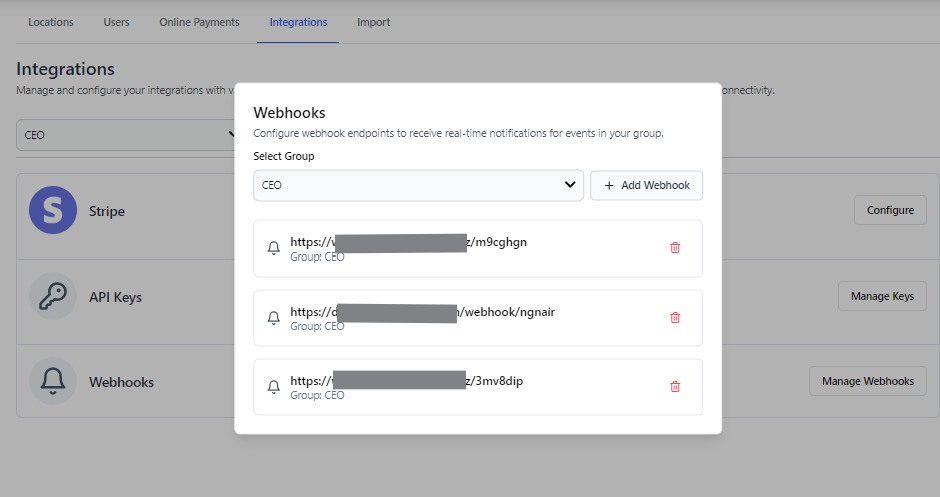
- In the modal that appears:
- Select the webhook group (events you want to subscribe to)
- Enter your endpoint URL
- Click "Create Webhook"
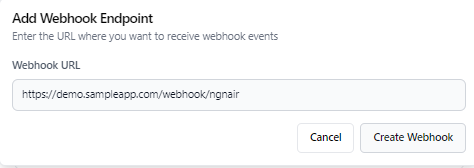
- Our system will send a test ping to verify your endpoint can receive POST requests
- Upon successful validation, you'll receive a Webhook Secret
- Store this secret securely
- You'll need it to validate incoming webhooks
Validating Webhook Signatures
Each webhook request includes a signature in the request body as signature. You can validate the signature to ensure the request is from NGN Air and not tampered with.
Example payload:
{
  "type": "payment_refund",
  "groupId": "MID-840-04-2025-000003",
  "payload": "{\"refund\":{\"id\":\"P-840-2025-00000144\",\"tx_id\":\"mock\",\"type\":\"AUTH\",\"status\":\"REVERSED\",\"channel\":\"CNP\",\"capture_mode\":\"AUTO\",\"amount\":1100,\"currency\":\"USD\",\"country\":\"US\",\"merchant_id\":\"DEMO-2025-000002\",\"group_id\":\"MID-840-04-2025-000003\",\"batch_id\":\"mock\",\"result\":\"mock\",\"message\":\"mock\",\"entry_mode\":\"mock\",\"pmt_id\":\"mock\",\"brand\":\"MASTERCARD\",\"masked_number_last4\":\"mock\",\"exp_month\":\"11\",\"exp_year\":\"26\",\"authcode\":\"mock\",\"brand_reference\":\"mock\",\"avs_address_result\":\"mock\",\"avs_postal_code_result\":\"mock\",\"avs_action\":\"mock\",\"cvv_result\":\"mock\",\"commercial_level\":\"mock\",\"payment_plan_id\":\"\",\"gsa\":\"\",\"emv\":\"\",\"created_by\":\"Admin Dashboard - Manual Entry - MERCHANT - (cm60k9qmc0005pg0jhd7yzu5x) t8uPuJPp0U TsUTU9m1F9\",\"customer_id\":\"cm68z81dw0027o00h7b9n80td\",\"customer_name\":\"324235234\",\"customer_email\":\"teste@exemplo.us\",\"customer_phone\":\"+1 (342) 234-3242\",\"customer_country\":\"US\",\"customer_address\":\"Rua Inexistente, 2000\",\"parentTransactionId\":null,\"created_at\":\"2025-01-27T13:14:40.320Z\",\"referenceID\":\"\"}}",
  "signature": "ea698a125aac761bbccb4af70512eb58679715c145c9f8499407d3c804ff802ef52bc327477b3d1293516c0420852beaf77dcbb3b03f280098b6f0e8f6eabb74"
}
// The function to hash the payload and validate the signature
export const hashSHA512 = async (input: string) => {
  const encoder = new TextEncoder();
  const data = encoder.encode(input);
  const hashBuffer = await crypto.subtle.digest("SHA-512", data);
  const hashArray = Array.from(new Uint8Array(hashBuffer));
  const hashHex = hashArray
    .map((b) => b.toString(16).padStart(2, "0"))
    .join("");
  return hashHex;
};

// Validate the webhook signature
export const validateWebhook = (
        groupId: string,
        ptype: string,
        payload: string,
        computedSignature: string,
) => {
  const payloadString = JSON.stringify(payload);
  let signature = await hashSHA512(
      `${groupId}::${ptype}::${secret}::${payload}`
  );
  return computedSignature === signature;
};

// Example usage
app.post('/webhook', (req, res) => {
  const payload = req.body;
  const signature = payload.signature;

  if (validateWebhook(
    payload.groupId,
    payload.type,
    payload.payload,
    signature
  )) {
    // Webhook is valid, process the payload
    console.log('Valid webhook received');
    res.status(200).send();
  } else {
    // Invalid signature
    console.log('Invalid webhook signature');
    res.status(400).send();
  }
});
Security Best Practices
- Keep your webhook secret secure and never expose it in client-side code
- Always validate the signature before processing webhook events
- Implement retry logic for failed webhook deliveries
- Monitor webhook events in the dashboard for debugging